
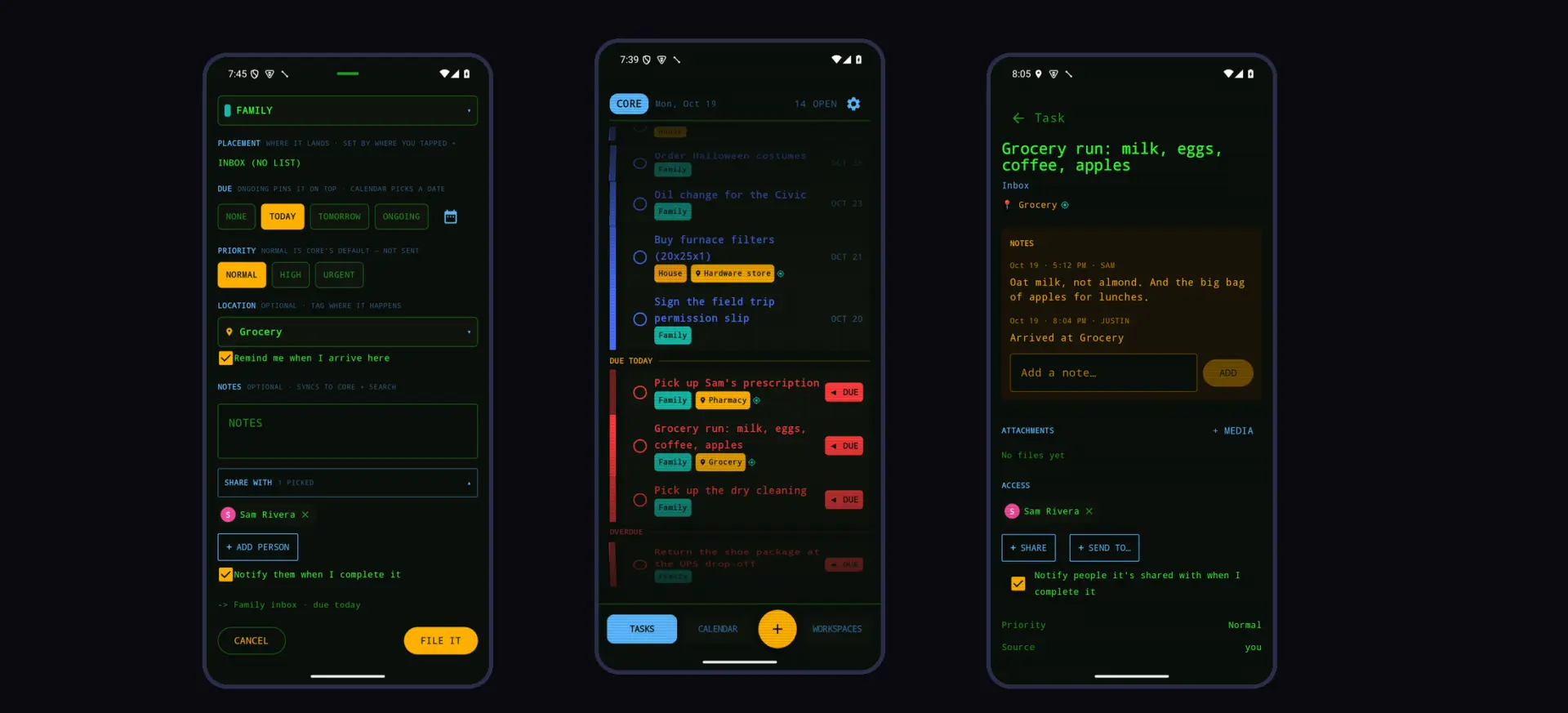
A second person adds three questions to every task
Punchlist is the phone half of Core, the task system my family runs on. It’s an Android app and a home-screen widget, and it’s never been public. Two of us use it every day on two phones, and a third account is set up but unused.
A task list for one person is just a list. Once a second person is on it, every task raises three questions. Who can see this? Who gets told when something changes? And when does it actually matter? This study is about how Punchlist answers the last two: telling the other person, and reminding you at the right place.
I planned, designed, reviewed, tested and operate it. I directed AI to build it, in 2026. When I say “I changed” something below, that’s what I mean.
The server decides who sees what. The phone obeys.
The sharing rules live on the server, and the phone obeys them. There’s one visibility rule: you see a task if you’re a member of the workspace it belongs to, if it’s been shared with you, or if its parent task has been shared with you. Anything you can’t see answers “not found”, not “forbidden”, so the app never confirms that something exists in a space you aren’t part of.
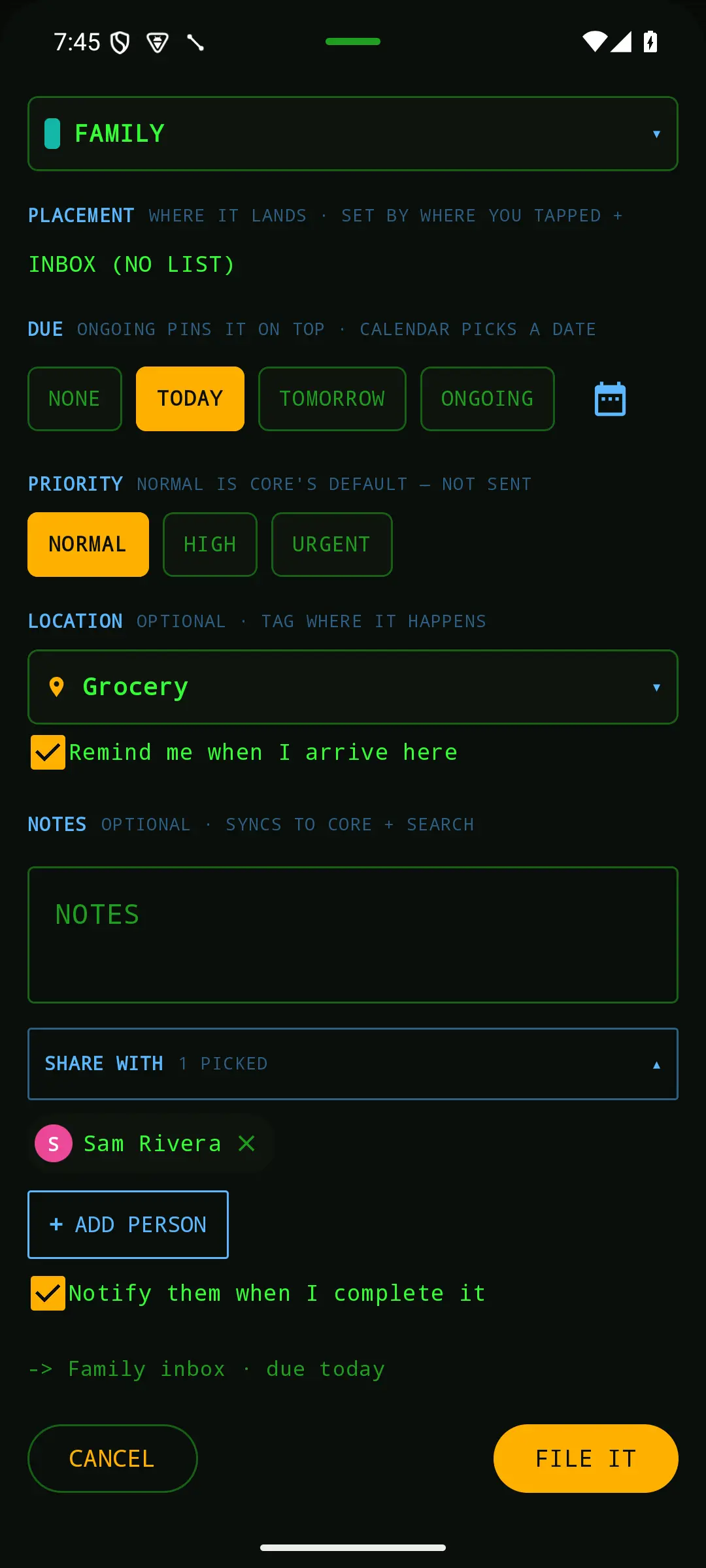
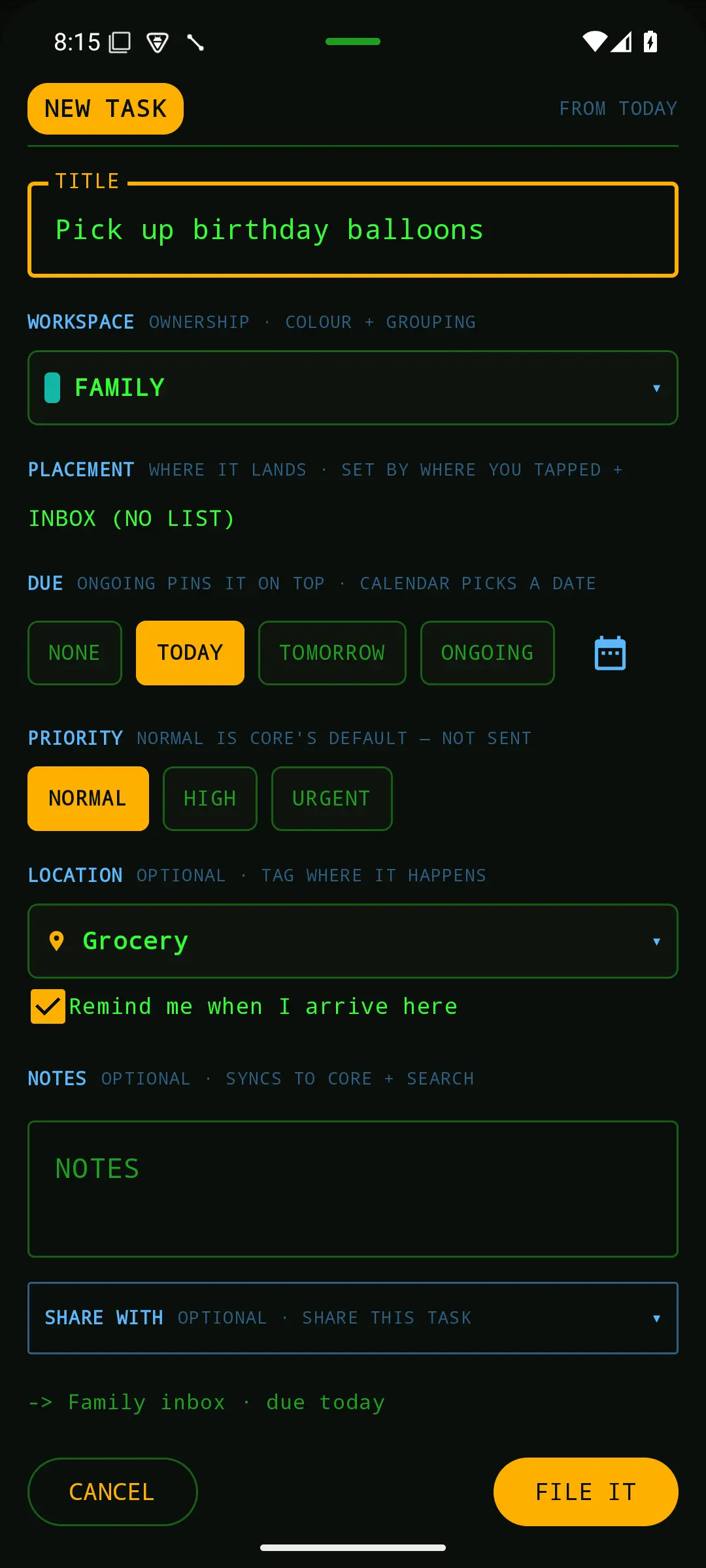
A task belongs to one workspace, and it can sit on a list that belongs to another. That split, ownership versus placement, is what lets a shared Today list hold tasks from everywhere. The capture sheet says it out loud: the workspace field is labeled as ownership, and the placement field as where it lands.
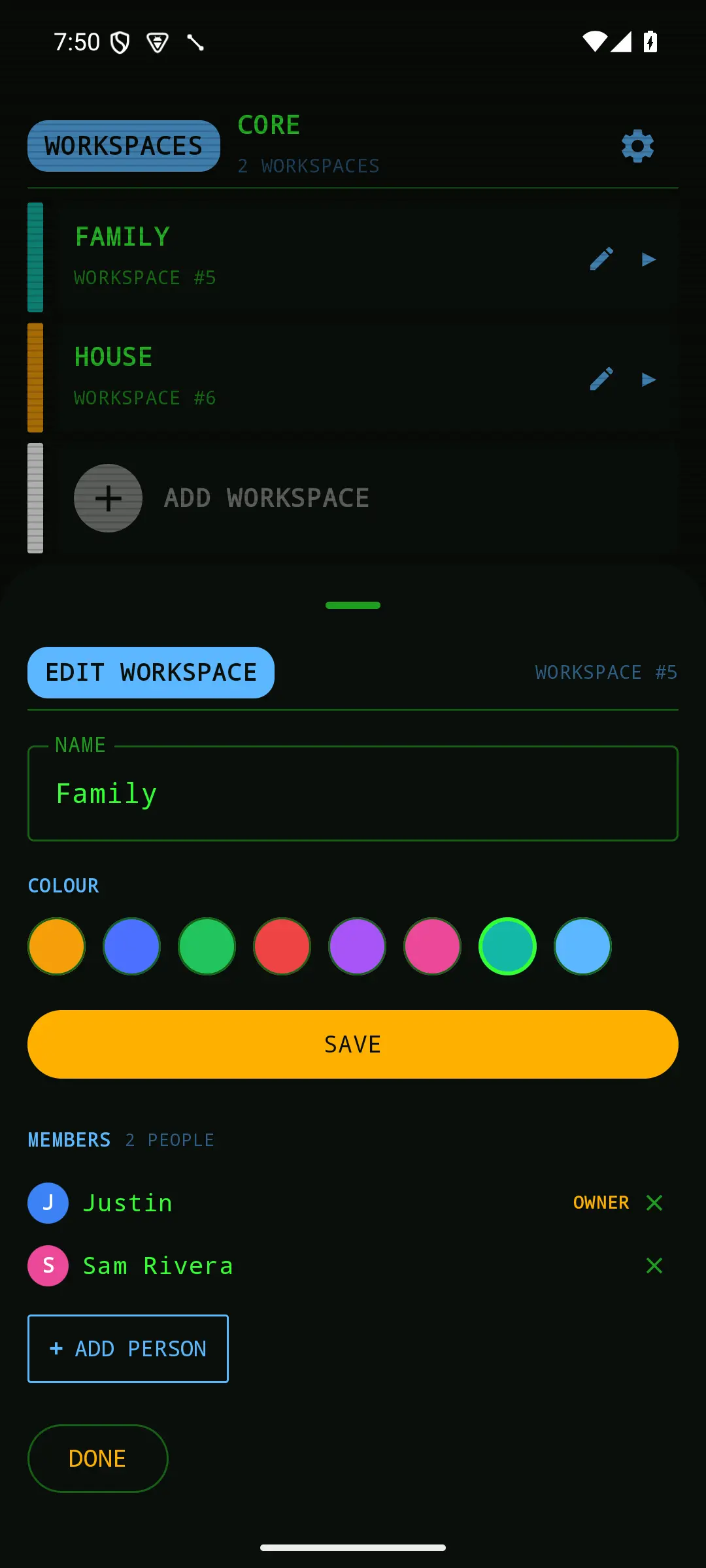
Roles are owner and member, and that’s all. A family doesn’t need a viewer tier or per-list permissions, and every extra role is one more thing to get wrong. Shares only ever add access, they never take it away.
Three ways to share, because people mean three things
There are three ways to share, because people mean three different things by it.
- Share means we both see it.
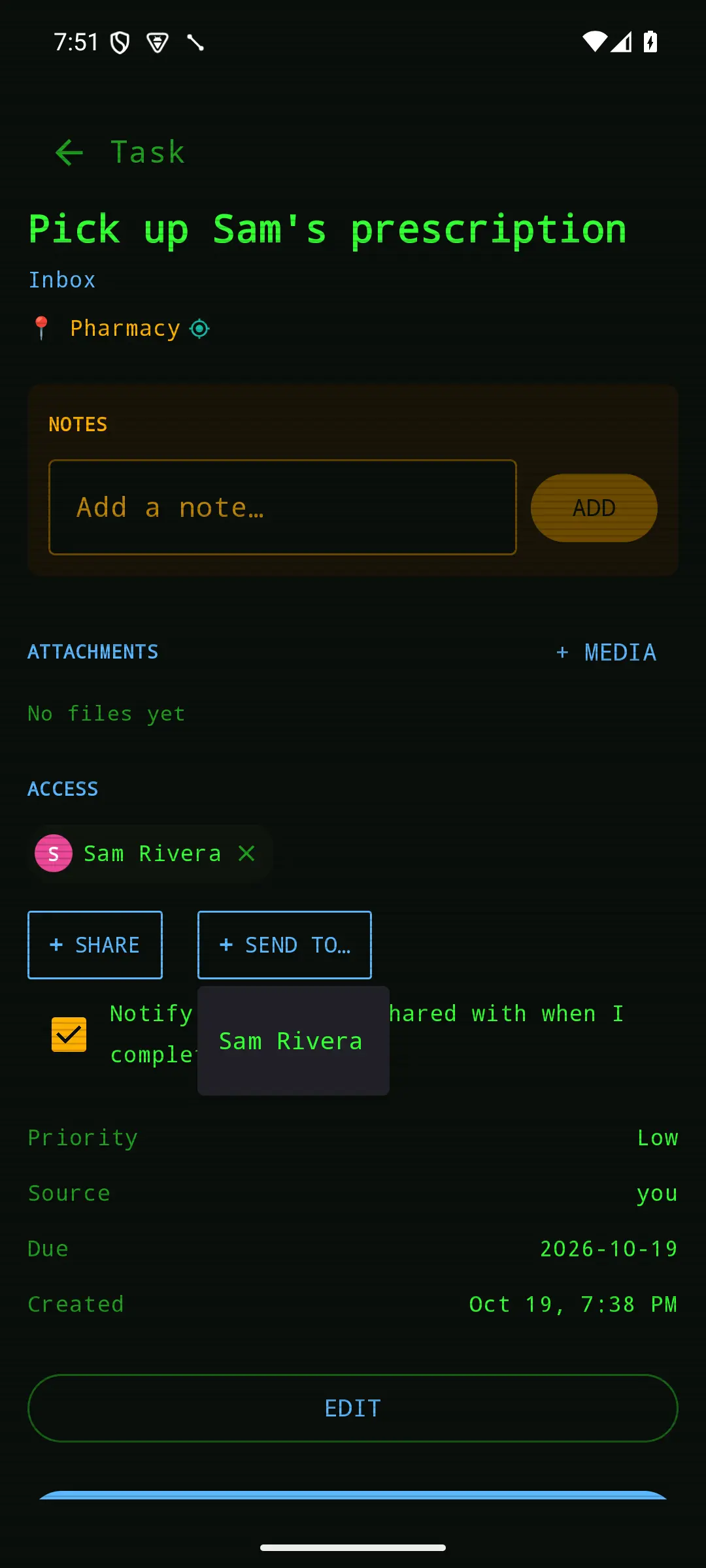
- Send to means it’s yours now. The server shares it and moves it onto the other person’s Today list in one step, because I can’t see into their private workspace to put it there myself.
- Share a workspace means everything in here is ours, now and later.
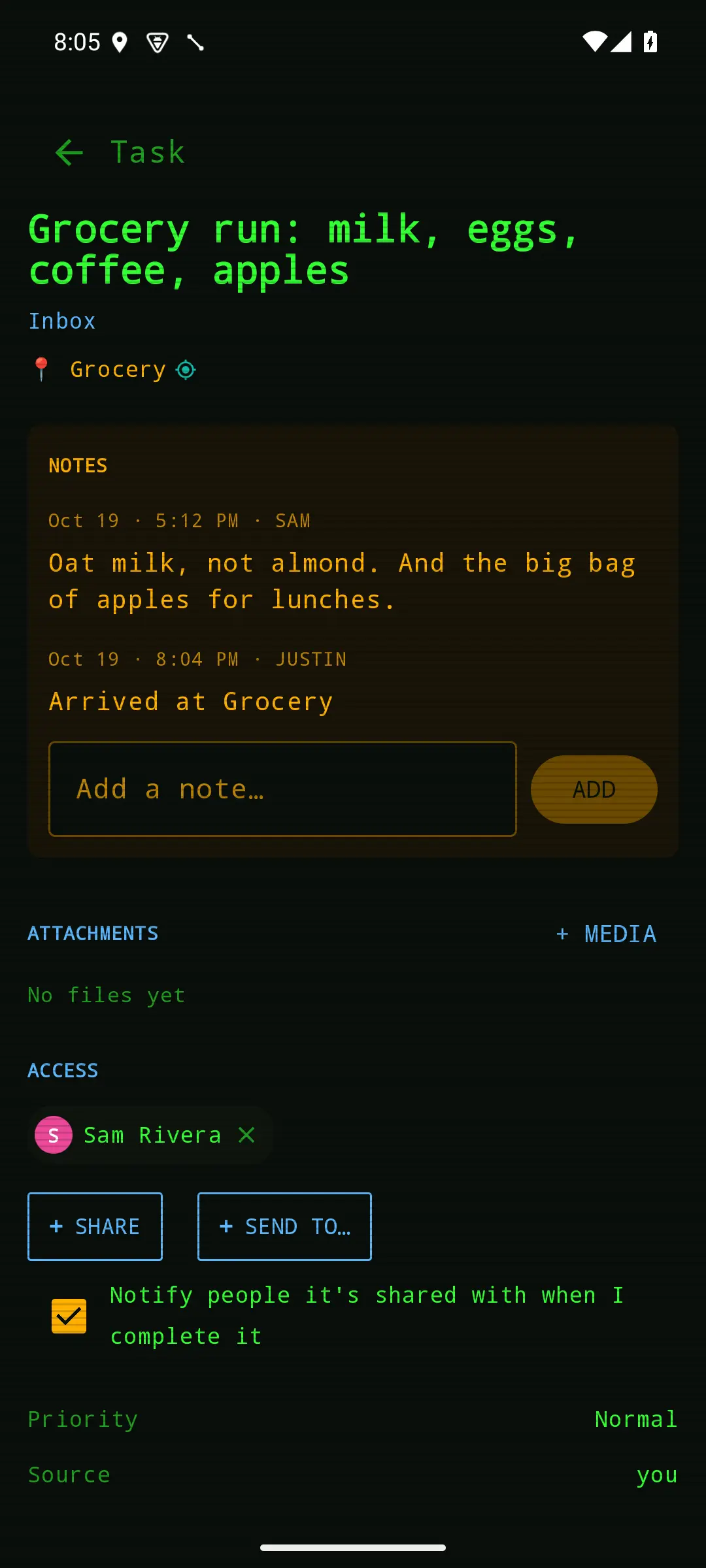
The fourth piece is quieter: a checkbox that reads “Notify people it’s shared with when I complete it.” In a workspace that has another member, it’s on by default, and you can still turn it off. A default, not a lock.
The capture sheet went through one round of my own review notes. “Share with” sat in a stack of identical blue labels and read as one more label, so it became a control you can see is tappable. The notify box only appears once you’ve picked someone, and it clears when you remove the last person, so a hidden yes can never ride along with a task. The checkbox and its label are one tap target.
A rule meant to keep quiet hid the first notification
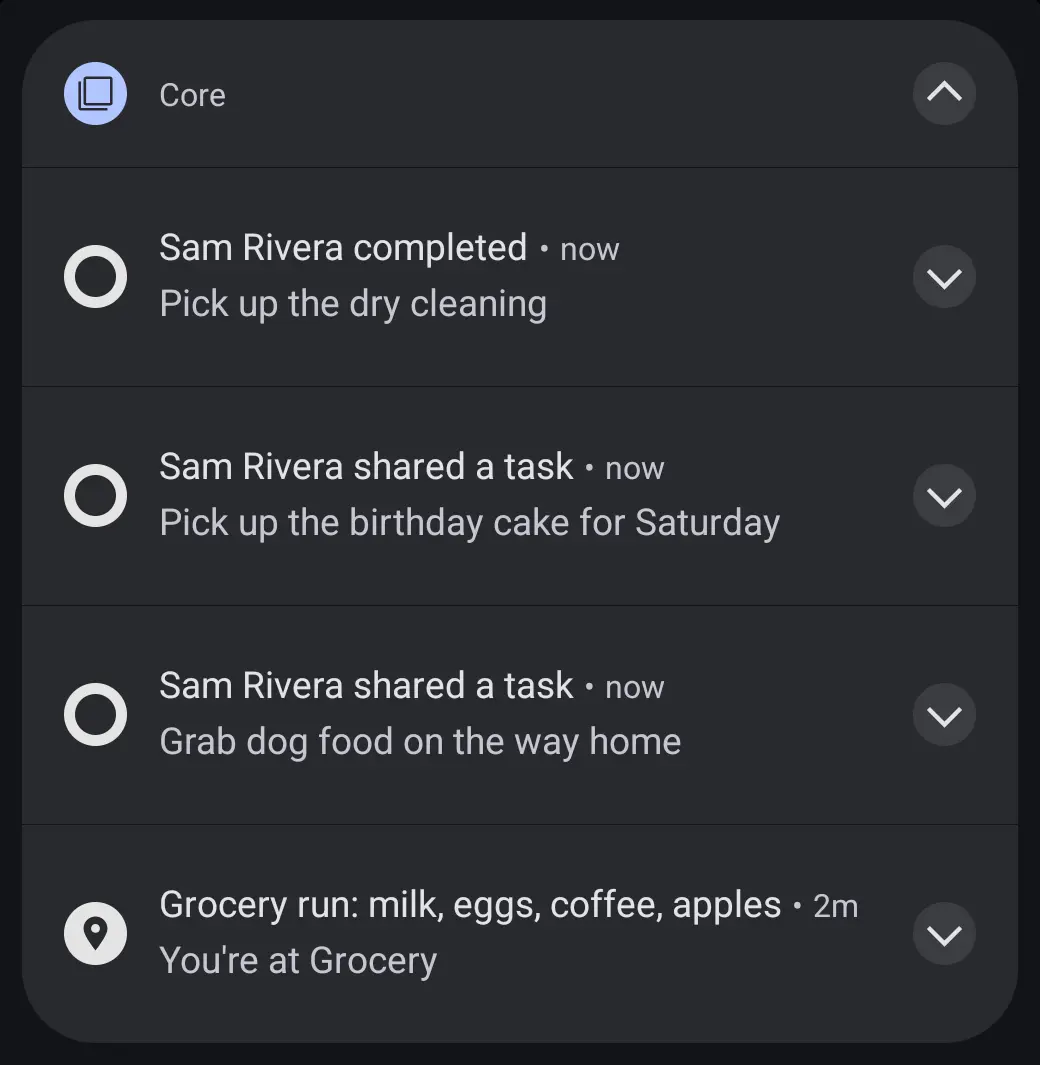
A notification can fail two ways: it never comes, or it comes for everything. The first version polled the server in the background and when the app opened, and it posted “<name> completed” or “<name> shared a task” on its own channel. To avoid dumping a backlog on a new install, the first poll marked everything it found as already seen.
That rule cost us the very first shared completion. The day the second phone was set up, I shared a task with notifications on and completed it, and the other phone stayed quiet. The server was right the whole time: it returned the task, every poll succeeded, and the channel was on. The first-run rule had quietly marked it seen.
What made it hard to find was that arrival reminders were working on the same phone. That looked like proof the notifications were fine. It wasn’t, because arrival reminders never ask the server for anything. The fix keeps the quiet first run, but still notifies anything completed in the last six hours, so setting it up and testing it works and a real backlog stays silent. It was confirmed on the second phone the same day.
Seconds, not fifteen minutes
Polling meant a notification could take fifteen minutes, so push came next. The poll stayed as the backup, which raised the obvious risk of hearing about everything twice.
The answer is one key per event. A share is the task plus the moment it was shared, and a completion is the task plus the moment it was completed. The server builds the push with exactly the key the phone’s poll would use. Whichever arrives first gets shown and remembered, and the other is skipped. That decision lives in a small piece of logic with no phone code in it, so every case is tested.
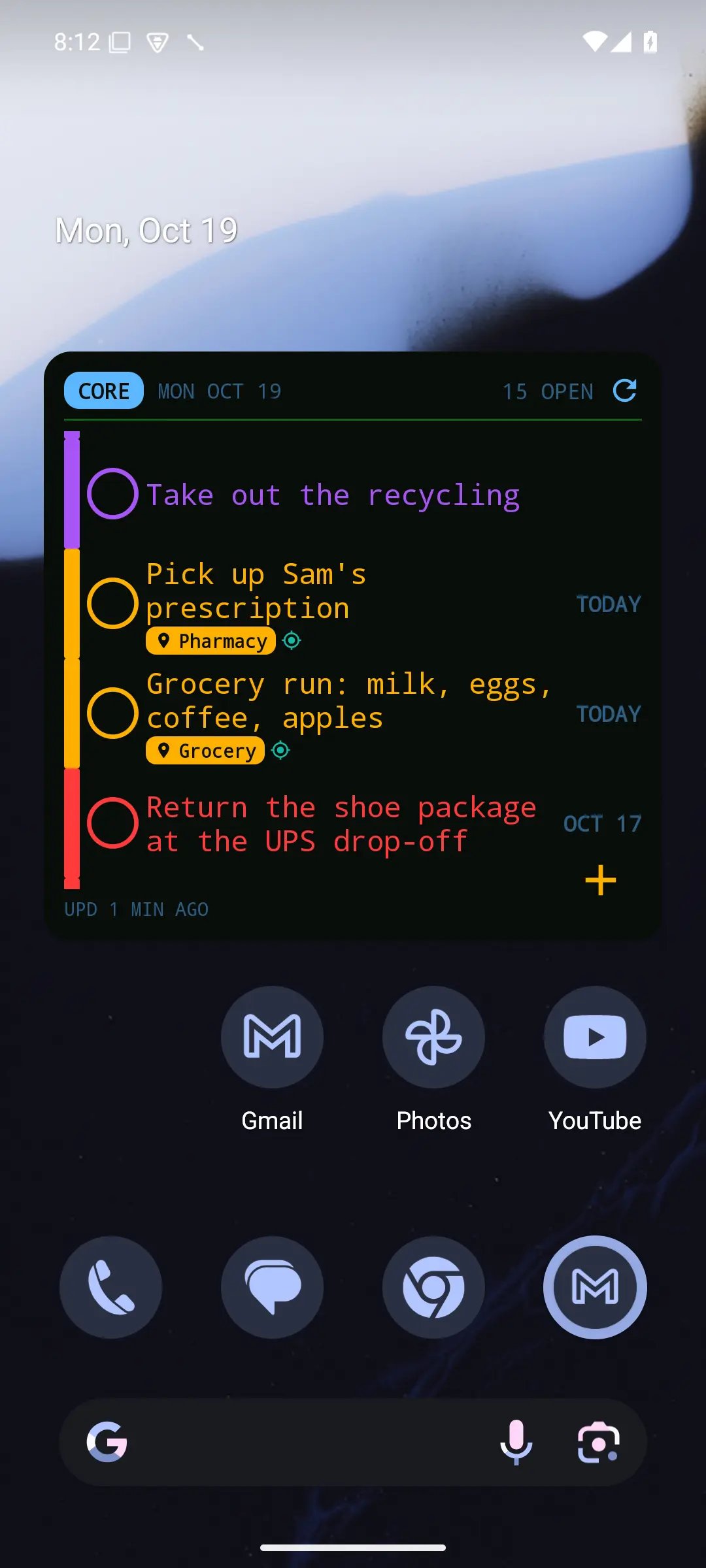
A silent push also goes out on every change to a task, to everyone who can see it, so the widget repaints. The first version sent it at normal priority, and the phone’s battery saver held it for minutes, so it now goes at high priority. In practice it lands in seconds.
One gap turned up on the web side. Dragging a card to Done on the board completed the task without recording who completed it, so nobody was told. Completions now record that event on every path, but only when a task actually changes from open to done, so re-saving a finished task doesn’t notify anyone again.
The server would be late, so the phone watches
A place on a task is really two features that look like one. The first is a tag: this happens at the grocery store. When someone who can see the task gets there, an arrival note is added to its notes with their name and the time. It never completes the task, and each person is logged once.
The second is a reminder: tell me when I get there. My first request was for the server to send it. The research said that couldn’t work. Our location app reports about once an hour, and the server has nothing that checks on a schedule, so it could never know I’d been somewhere for five minutes. A reminder from the server would land minutes to an hour late.
Three options went on one page: push from the server, let the phone watch for places itself, or make the location app report faster. I chose the phone. Android can already tell an app when you’ve stayed inside an area for a set time, it works offline and with the app closed, and it needed less new infrastructure than the others. The cost was asking for background location in the app, and I accepted it. A single location source is still the plan for later.
A reminder you can’t swipe away by accident
The phone watches one area per place, not one per task, because when you arrive it only knows where you are. It then asks the server which tasks belong there, rather than trusting what it knew when it set the watch, since a task may have been finished in the meantime. It waits until you’ve been inside for five minutes, and it also fires if you were already there when the watch was set.
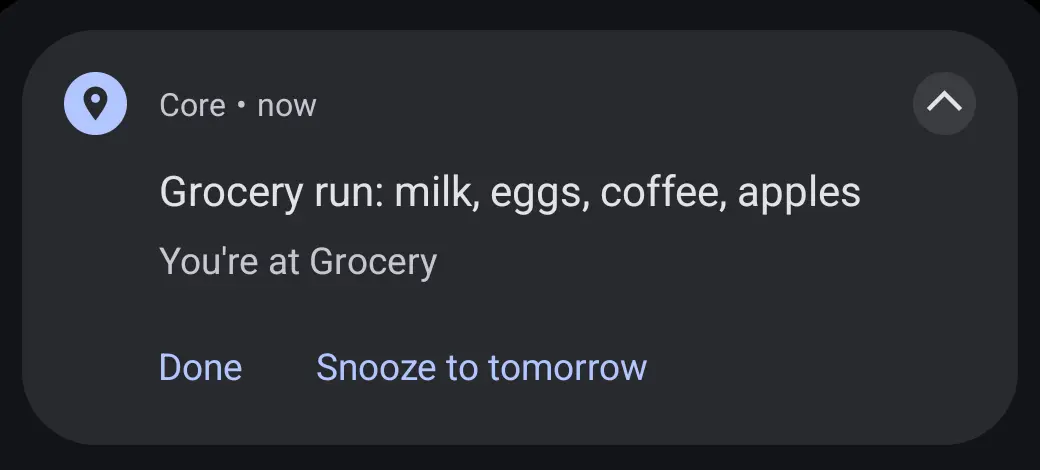
The reminder is a notification you can’t swipe away, because a reminder you can lose by accident isn’t much of a reminder. It says “You’re at Grocery” and offers two actions: Done and Snooze to tomorrow. Either one saves to the server before the notification goes away. If the phone can’t reach the server, the notification stays up and says so, rather than disappearing with nothing saved.
Permissions get one message at a time, hardest blocker first: location, then notifications, then background location.
Ask before reminding
The first version reminded you about every task that had a place. That made the place field something to avoid, since tagging a task meant signing up to be pinged. So I made the reminder a choice in the moment: a checkbox that reads “Remind me when I arrive here.” It’s off by default, and it only works once a place is set.
It’s also one-shot. I chose that over reminding you every time until it’s done, and once a reminder fires, it disarms. The web app kept working untouched, because a request that doesn’t mention the checkbox keeps the old behavior.
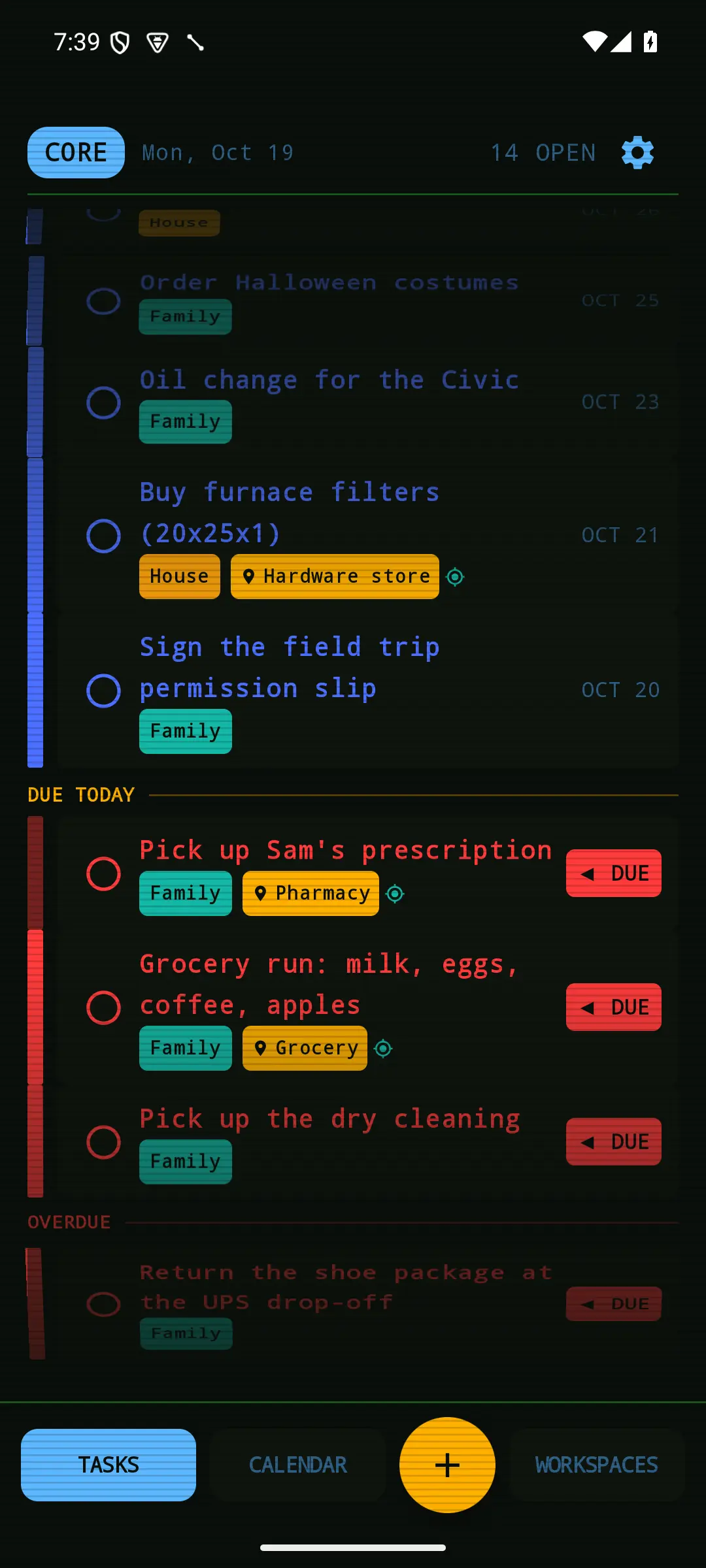
An armed reminder shows a small teal target next to the place, on the task, the wheel, the widget and the web. Teal sits outside the colors that already mean due, overdue, upcoming, undated and done, so it marks the reminder without restating anything else. I picked teal for that reason, and dropped a text label that said the same thing twice.
It wasn’t the location app. It was three other things.
In mid-September I reported that tasks had stopped firing at their places. I assumed the location app had stopped reporting. It hadn’t; the server had a location from six minutes earlier. There were three separate problems.
The phone remembered a watch the system had forgotten. To avoid restarting a five-minute wait every time the app opened, the phone kept a record of the places it was already watching and only changed the difference. That record survived a reboot. The system’s watches didn’t. So after one reboot, the phone saw nothing to change and watched nothing. Android also drops them on every app update, so each update I shipped broke it again. There’s no way to ask the system what it’s watching, so the fix is to start over whenever it might have forgotten: after a reboot, after an update, and every six hours as a backstop. Never when the app opens, because starting over restarts the five-minute wait you might be in the middle of.
A second pin at the same spot could never win. I’d added a second pin for the shop at exactly the same coordinates as the first, instead of renaming it. When you’re inside two places at once, home wins, then the one you visit most, so the old pin won every time. The new one showed zero visits after 387 location reports from inside it. That zero is the proof: nothing armed at the new pin could ever fire. The repair order mattered, too. Fixing it on the location app first would have deleted the real place and its history, so the server was fixed first.
The reason the duplicate existed. The location app sends its places to the server every night, and the server removes the ones that are gone. But a place has to outlive its deletion so tasks keep their tag, and the nightly sync assumed any place could be deleted. Both rules are right, and they can’t both hold. So deleting any place a task had ever used made the whole sync fail, every night, with nothing on screen to say so. The fix removes places one at a time, keeps any that a task still uses, and reports how many it skipped. A silently skipped row is what hid this for weeks. That fix isn’t live yet, and it’s the one piece of this story that’s still open.
I was advised twice to delete the wrong pin, based on the server’s copy of the list rather than the app’s. Now I check the source before changing a place.
The message that refreshes the widget now refreshes reminders
Two days after those fixes, I reported another miss. It was diagnosed from the server log alone, without the phone. The phone’s last request for its watch list came back empty, which was correct at the time, and the new task had been armed from outside the app, so the phone was never told.
The silent push that kept the widget live never touched the watches. Now it updates them too, the gentle way, so an unrelated edit never restarts a wait you’re in the middle of.
Reminders now reach the phone three ways. A push gets there in seconds from anywhere. A change made in the app is immediate. And the six-hour restart is the slowest, but it’s the only one that survives the system quietly forgetting everything.
What it took, and what’s still open
This is a household tool, not a product. There are two people and two phones, so there are no adoption numbers, only daily use and the measurements above. The sharing and location work covered about five weeks, from mid-August to mid-September 2026.
Every feature started as a written plan in the repository, and decisions were dated and attributed there. A shared-workspace change went through an adversarial review that found six real problems before it shipped. A local sandbox points only the emulator at a copy of Core, because a test once created a real task in our live list. Every screen here was captured from that sandbox with invented people, tasks and places.
Still open:
- Arrival notes on the server are only recorded for me. The location app doesn’t yet say whose phone a location came from. The phone’s own reminders already work for each person.
- The nightly place sync. The fix that keeps one in-use place from taking the whole sync down is written, but it isn’t in production yet.
- A single source for location is still the plan for later. Until then, Punchlist does its own watching.
- Writing this study turned up one more bug, now fixed. Snooze to tomorrow had stopped bringing a reminder back, because firing a reminder disarms it and Snooze didn’t re-arm it. It does now, and the fix went out to both phones through the in-app updater.